Incidents and on-call, on the web and iPhone

Your stack’s map,
for you and your AI.

Kitomer maps every place in your stack, watches whether it is up, and pages whoever is on call. Your AI can trace an incident from that same map.

Free for 30 days. Connects GitHub, Fly, Cloudflare, and Sentry.

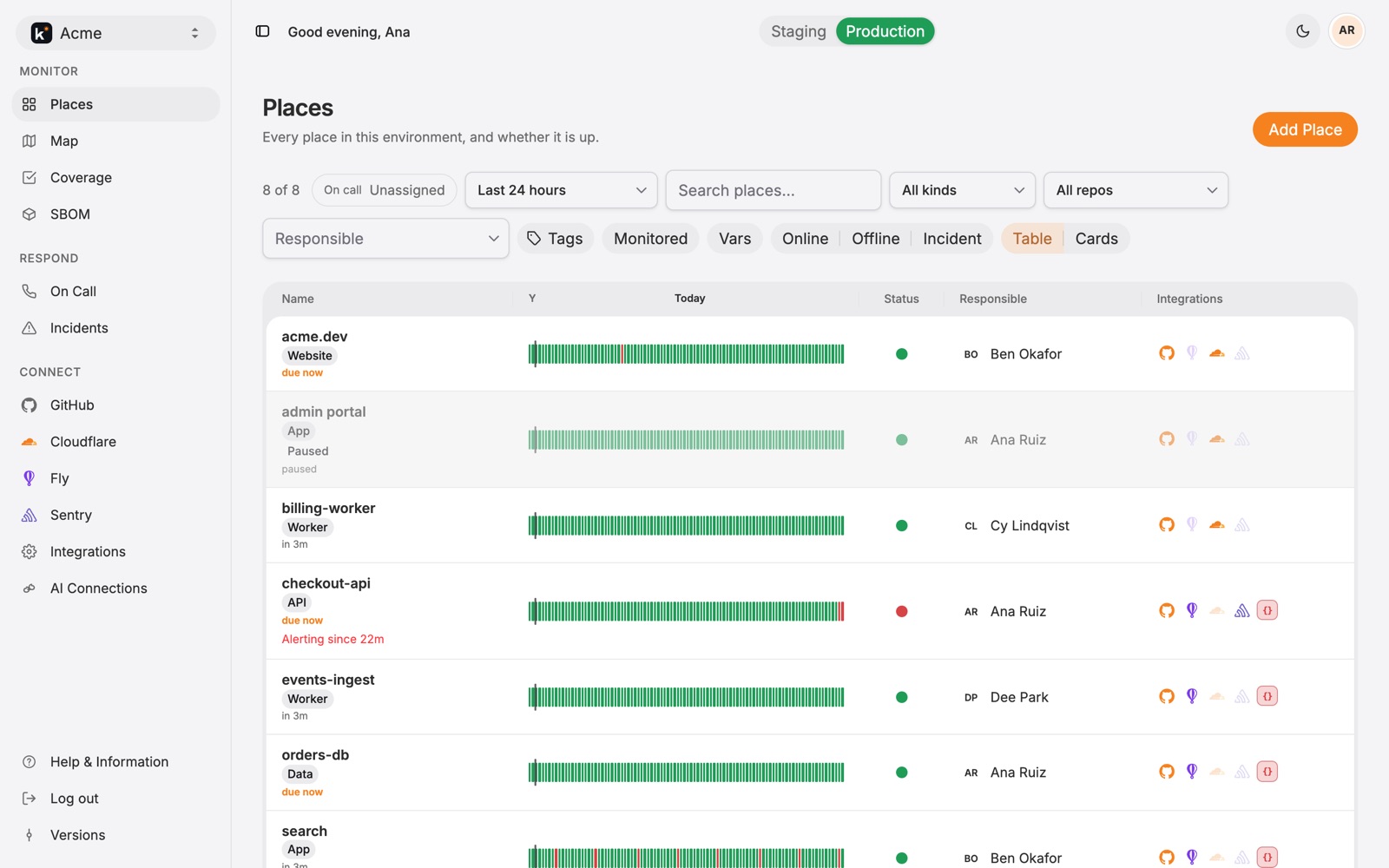
The Places board for the Acme organization: eight places with their 24-hour heartbeat bars, status, responsible person, and integration icons. checkout-api is red and alerting since 21 minutes.
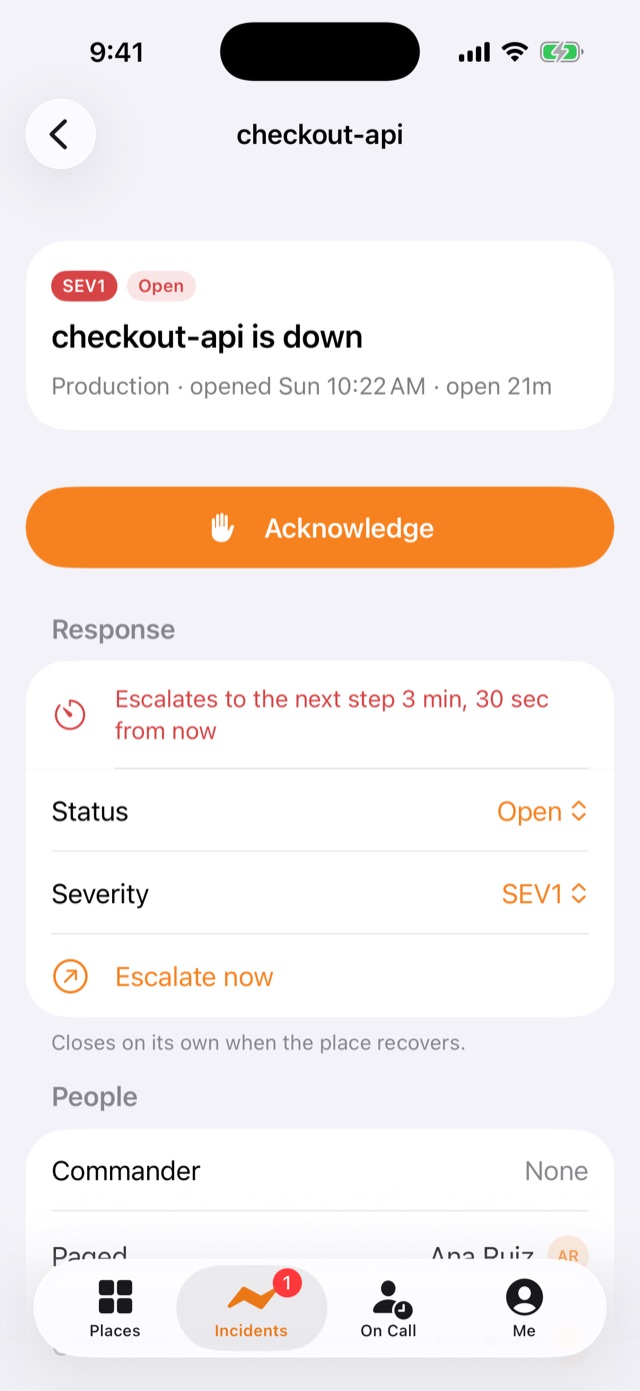
The Kitomer iPhone app showing checkout-api is down, SEV1, open 21 minutes, with a large Acknowledge button and the next escalation step counting down

The map, the page, and the trace

Places, coverage, on call, and incidents live on one map. The people who run the stack and the AI clients signed in as them read the same thing.

Places

Every app, website, API, worker, data store, and external dependency, with its environment, its kind, and the person responsible for it.

Heartbeats

Kitomer checks each place’s health URL on a schedule, from every minute to every hour: up or down, the HTTP status, and the latency.

The map

One canvas per environment shows how your places connect. Draw links by hand, or generate them from domains and vars.

Coverage

Four scores show what is still missing: GitHub repos, Fly apps, and Cloudflare resources not linked to a place, and places not on the map.

On-call schedules

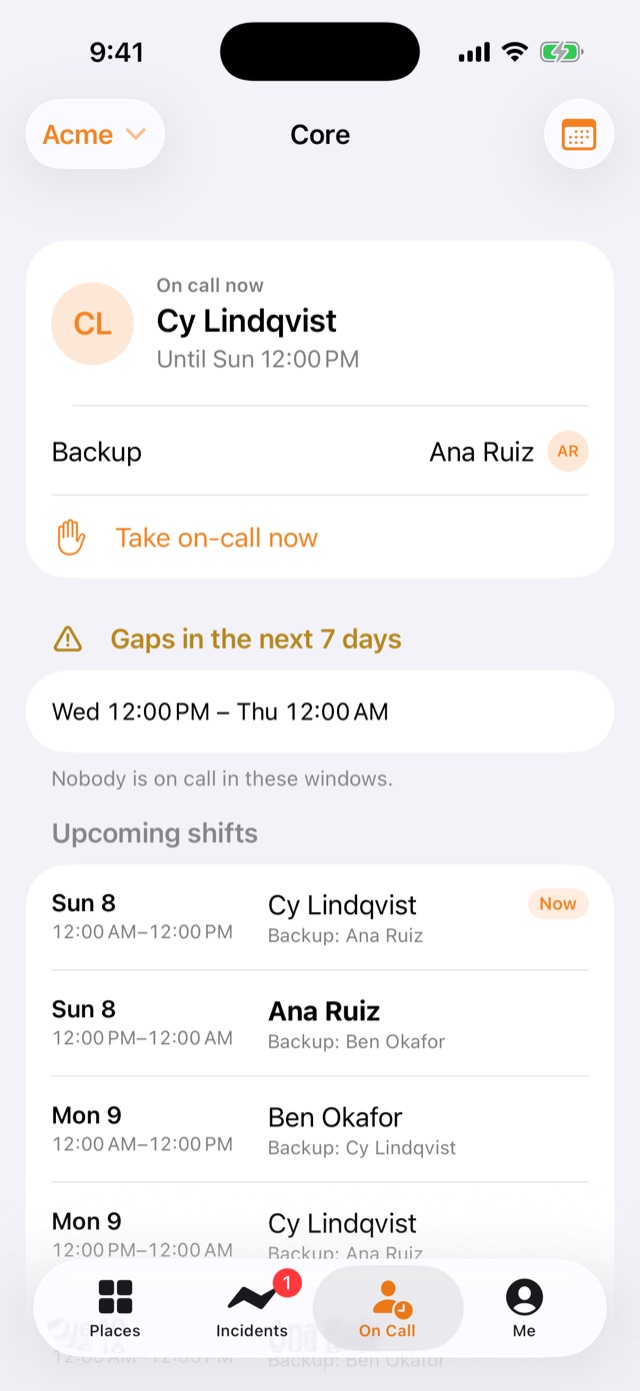
A repeating week of shifts with a principal and a backup. Cover, swap, or take on-call now. Hours with nobody on call are shaded.

Escalation

The ladder a page climbs until someone acknowledges: who, after how long, and how many times. SEV1 skips the delays.

Three ways an incident opens

A health check crosses an alert policy, an inbound webhook from Sentry, Cloudflare, or Datadog fires, or a person declares one.

Acknowledge from anywhere

The portal, Slack, the iPhone app, an SMS reply, a phone call, or your AI. Acknowledging stops escalation and leaves the incident open.

Investigation

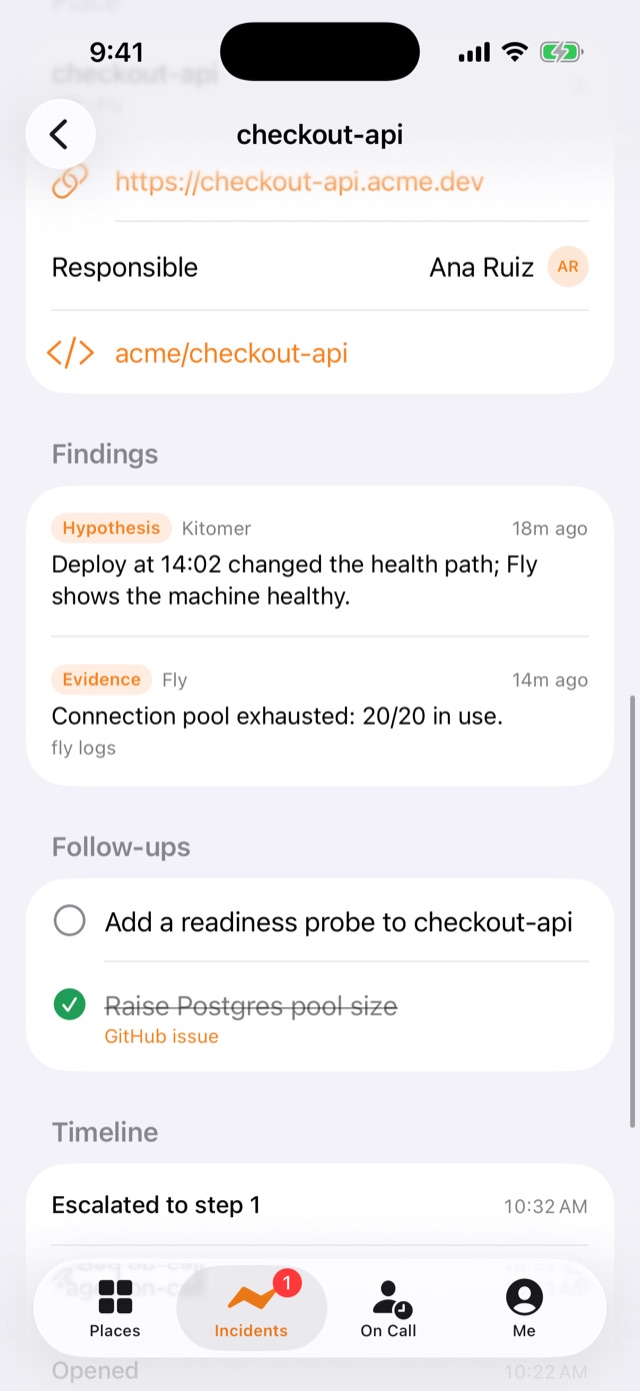
Findings with their evidence, similar past incidents, a write-up drafted from the timeline, and follow-ups that become GitHub issues.

Insights

MTTA, MTTR, how many pages escalated, pages per shift, the noisiest places, and on-call load per person, including out-of-hours pages.

Your AI, signed in as you

Cursor and Claude read the same places, heartbeats, on-call, and incidents over MCP, with your access level. See the tools.

An iPhone app and a widget

See what is down, acknowledge, move an incident along, and know who is on call, from the app or your Home Screen. Meet the app.

Paging that fits each person

Email, SMS, voice, browser push, or iPhone. A typical ladder is push now, SMS after two minutes, a call after five. Send yourself a test page.

Software bill of materials

Scan connected repositories for licenses, checked against your policy: approved, review required, or prohibited.

Maintenance windows

Planned work on one place or every place, for up to seven days. Checks keep running, and no new incident opens.
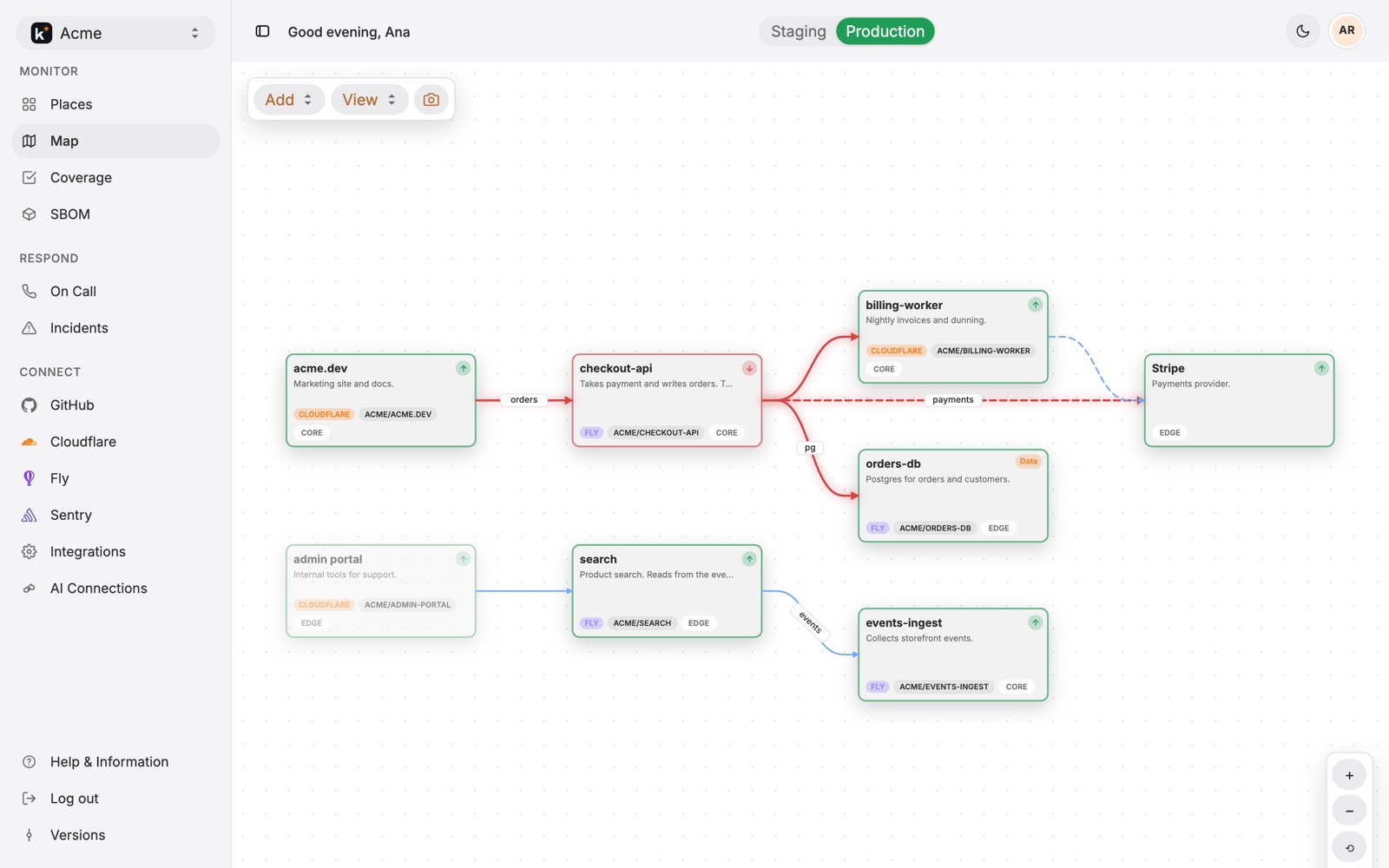
The map for Acme in production: acme.dev links to checkout-api, which links to billing-worker, orders-db, and Stripe. checkout-api and its outgoing links are red.
The view

See how your stack connects

A place has a name, an environment, a responsible person, and a probe that says whether it is up. The map shows how those places connect, so a red card shows what sits downstream.
  • One canvas per environment: staging, UAT, and production each get their own.
  • Draw links, or generate them from domains and vars. Label them, dash them, and choose which side each end attaches to.
  • Linked to your accounts. Each card shows its GitHub repo, Fly app, Cloudflare resource, and Sentry project.
  • Download a picture of the canvas for a design review or a postmortem.
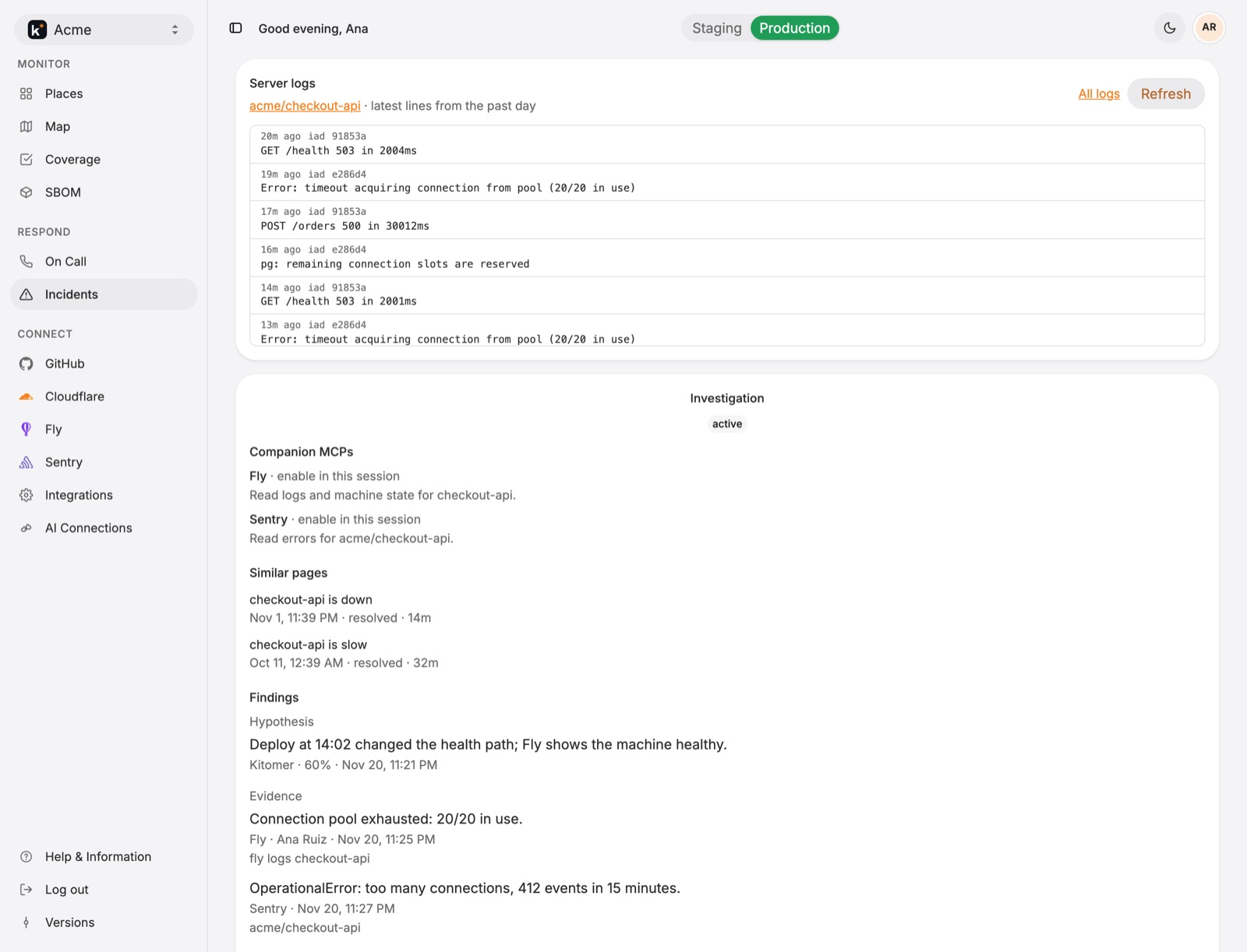
An open incident on checkout-api: recent Fly server logs show connection pool timeouts, and the investigation lists companion MCPs, similar past pages, and findings
Control

On call gets the page. You keep the record.

An incident opens from a failed probe, a webhook, or a person. The principal is paged at once, then the backup, then the org admins, until someone acknowledges.
  • Severity decides the reach. SEV1 reaches every verified method. SEV4 posts to channels and pages nobody.
  • A commander and responders. Add someone and they are paged and hear every update. Escalate now, or merge one incident into another.
  • Findings next to the evidence: recent Fly logs, similar past incidents, and the Sentry and Fly MCPs to turn on.
  • A write-up and follow-ups. Draft the write-up from the timeline. Closing the GitHub issue checks the follow-up off.
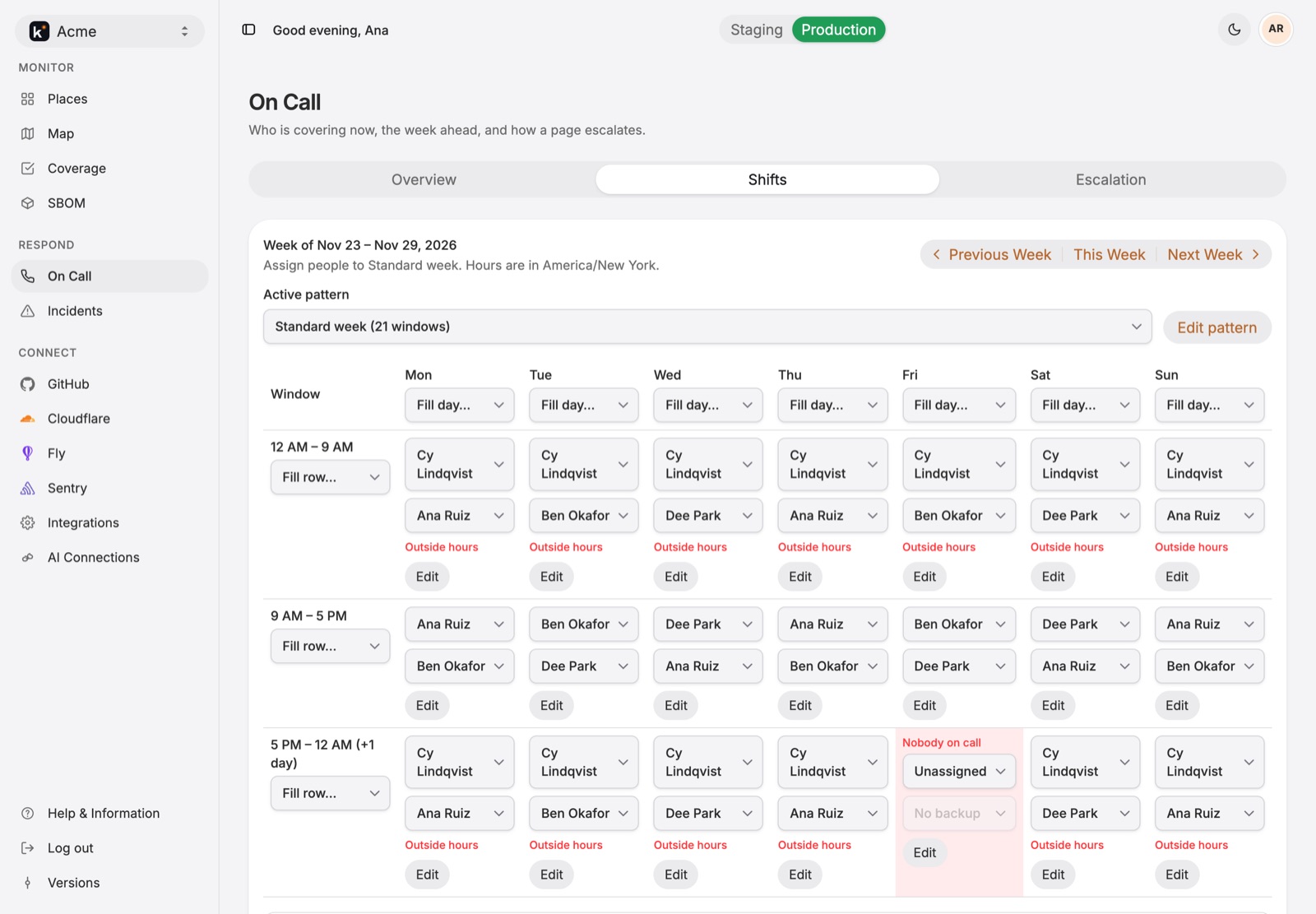
The Core on-call schedule for next week: nights with Cy Lindqvist, days rotating between Ana Ruiz, Ben Okafor, and Dee Park, an override covered by Dee Park, and Friday evening marked Nobody on call
On call

Know who has the pager

One schedule per team, each with a timezone, an acknowledgement timeout, and an escalation policy. Who is on call is separate from who owns a place.
  • A week pattern of shifts with a principal and a backup, applied week after week.
  • Gaps stand out. Nobody-on-call hours are shaded, and a page during a gap skips to the next step.
  • Cover, swap, and take on-call now without touching the pattern.
  • Working hours per person, with a warning when a shift lands outside them. Plus a private calendar feed of your own shifts.
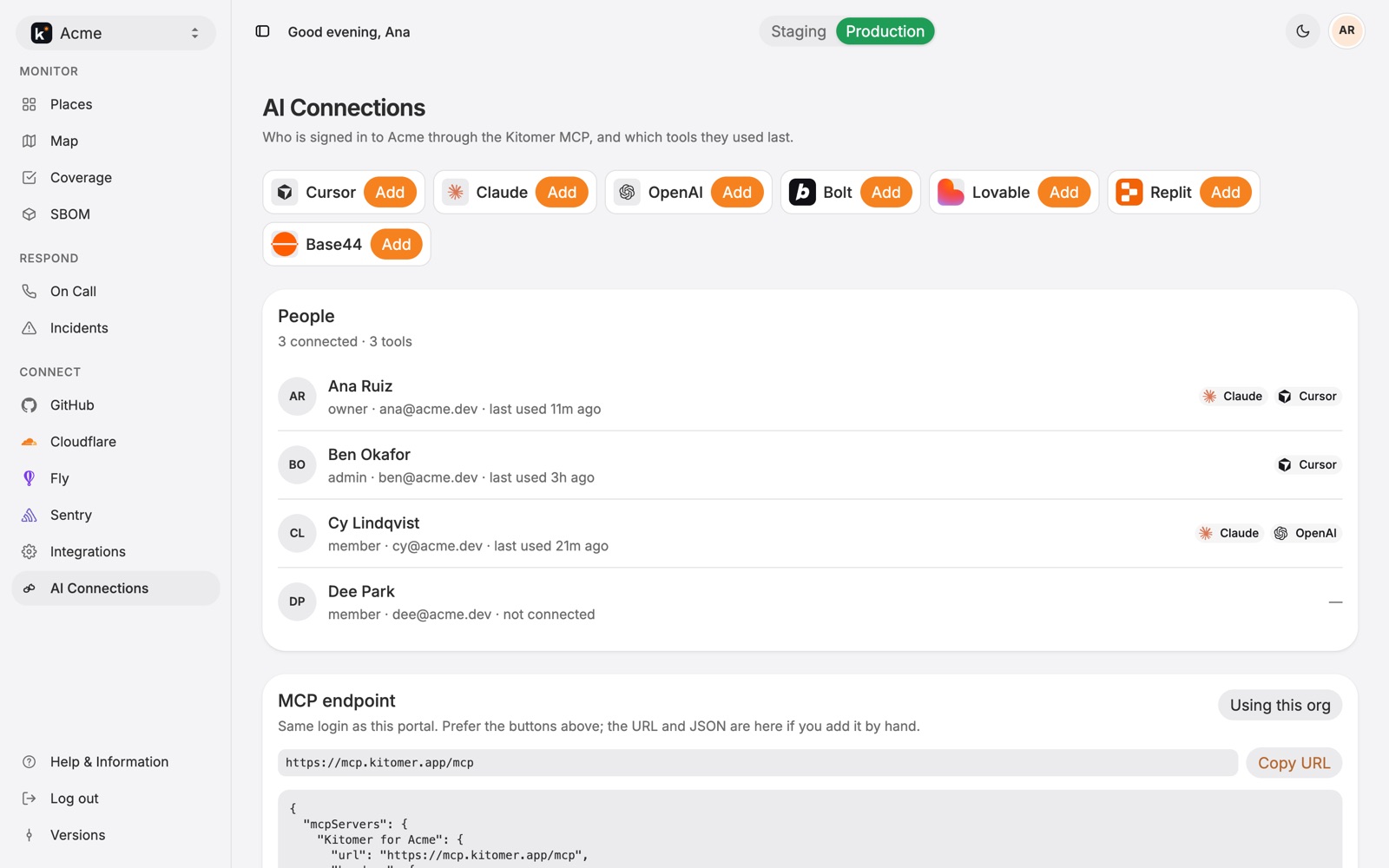
AI Connections: who in Acme has signed in through the Kitomer MCP, with Claude, Cursor, and OpenAI, and the MCP endpoint to copy
Your AI

Cursor and Claude trace from the map

The Kitomer MCP gives an AI client the same places, heartbeats, on-call, and open incident, signed in as you. Writes follow the same roles as the portal.

> Why is checkout-api down?
get_incident      SEV1 · open 21m · nobody has acknowledged
get_place_logs    timeout acquiring connection (20/20 in use)
add_incident_finding evidence · fly logs
  • 52 tools for status, places, vars, checks, incidents, integrations, and on-call.
  • Kitomer does not deploy, and it does not change secrets.
See every MCP tool
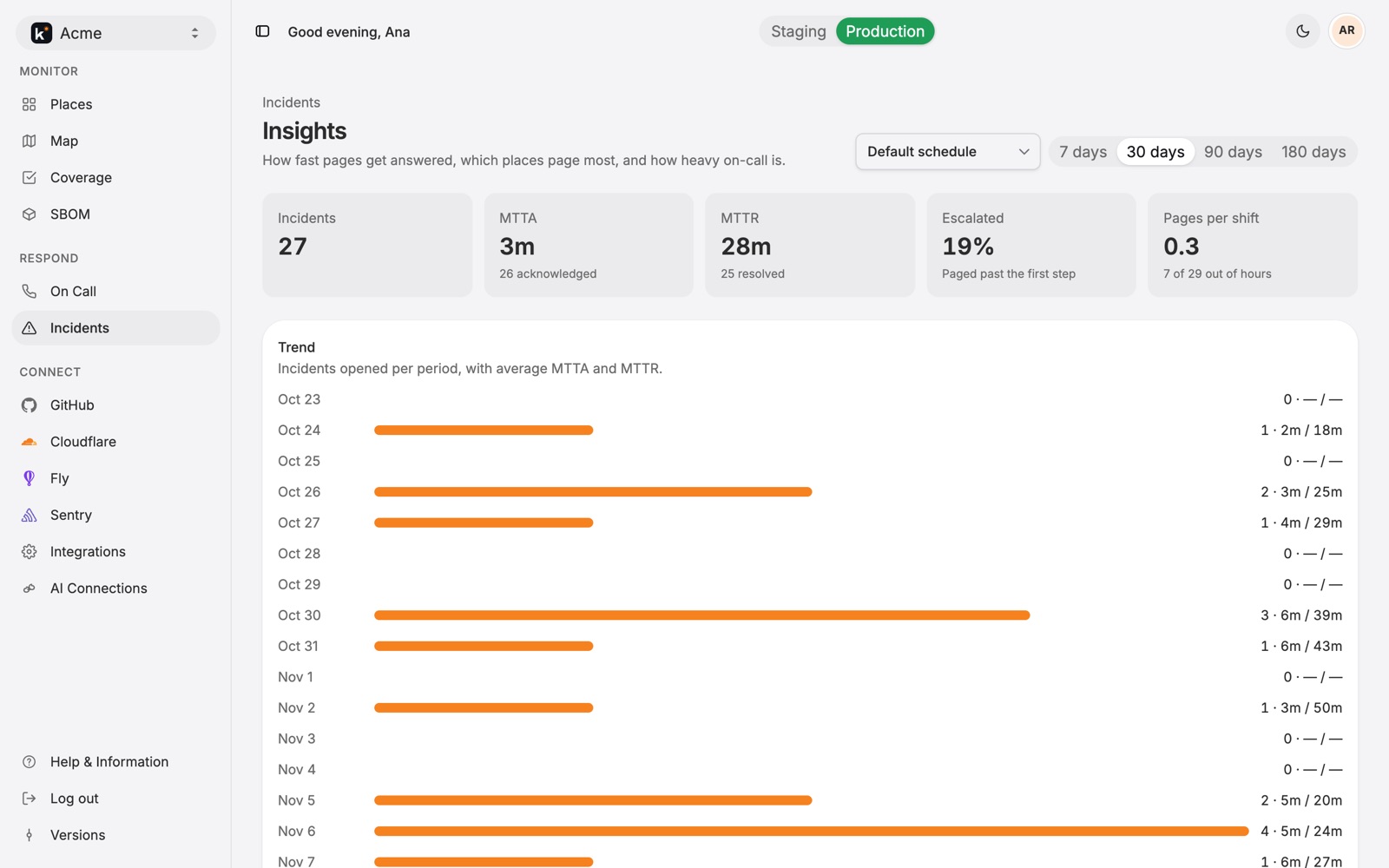
Incident insights for the last 30 days: 27 incidents, MTTA 3 minutes, MTTR 28 minutes, 19% escalated, 0.3 pages per shift, and a daily trend
Insights

How fast pages get answered

By schedule, over 7, 30, 90, or 180 days: which places page most, and how heavy on-call is.

  • MTTA and MTTR, and how many incidents escalated past the first step.
  • Pages per shift and how many came out of hours.
  • The noisiest places, and on-call load for each person.
iPhone

The responder’s side, in your pocket

The Kitomer iPhone app signs in to the same account and organizations as the portal. See what is down, acknowledge, move an incident along, and know who is on call.
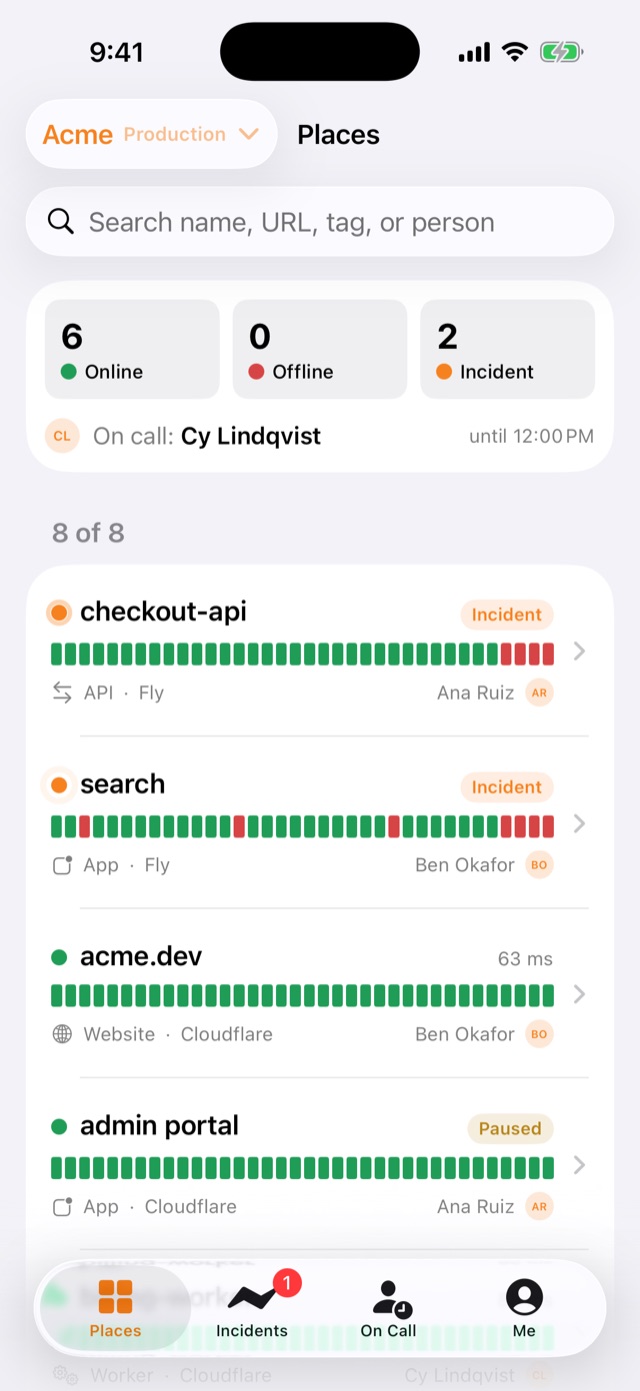
Places on iPhone: 6 online, 0 offline, 2 incidents, Cy Lindqvist on call, and each place with its heartbeat bar
Places
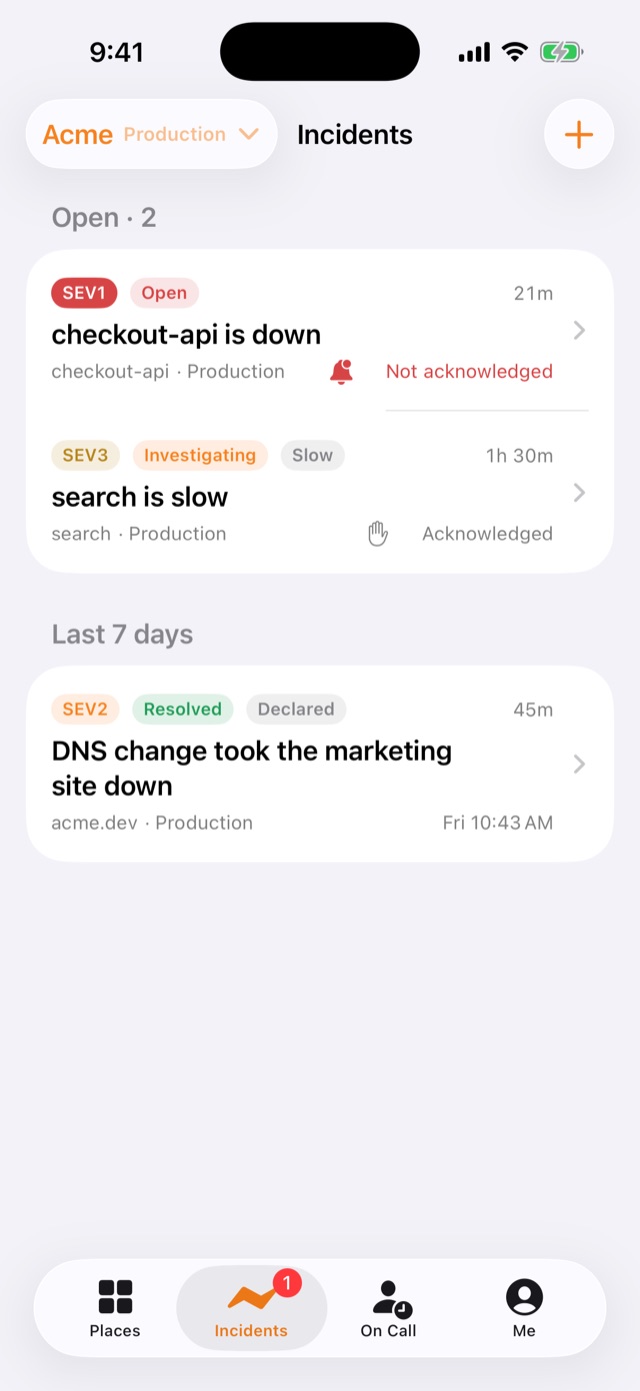
Incidents on iPhone: checkout-api is down, SEV1, not acknowledged; search is slow, SEV3, acknowledged; and a resolved DNS incident
Incidents
An incident on iPhone with findings from Kitomer and Fly, and follow-ups to tick off
Findings and follow-ups
On Call on iPhone: Cy Lindqvist on call now, Ana Ruiz as backup, Take on-call now, a gap in the next 7 days, and upcoming shifts
On call
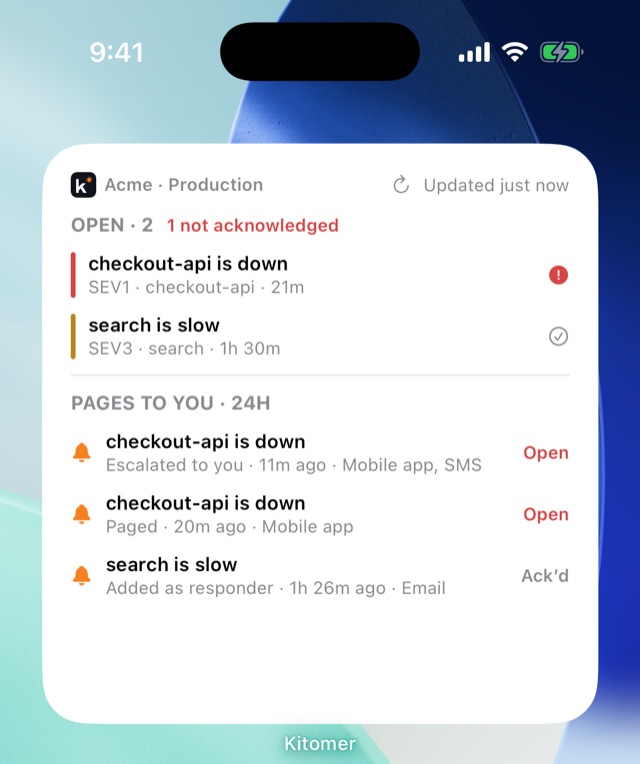
The large Kitomer widget on the Home Screen: Acme production, 2 open with 1 not acknowledged, and three pages to you in the last 24 hours

Open incidents on your Home Screen

The Kitomer widget shows how many incidents are open and how many nobody has acknowledged, in red, plus the pages sent to you in the last 24 hours across your organizations.

  • Not acknowledged first, then by severity, with the place and how long each has been open.
  • Pages to you: paged, escalated to you, added as responder, or a reminder, with the methods each one reached.
  • Every size: small, medium, and large on the Home Screen, and circle, rectangle, and inline on the Lock Screen.
  • Tap to open the incident in the app.
Plans

Start free for 30 days

Every organization starts on a 30-day Free trial. Anyone in the organization can see its plan; owners and admins request an upgrade.

Free

$0

30-day trial

  • Places, heartbeats, the map, and coverage
  • On call, escalation, and incidents
  • The Kitomer MCP and the iPhone app

Enterprise

$35 a month

Priority support and room to scale

  • Everything in Paid
  • Up to 10+ users
  • Priority support
Kitomer logo

Map your stack today

Create an account, connect GitHub, Fly, or Cloudflare, and turn on monitoring. Heartbeats start within five minutes.